Pepper SMS Opt-In
Pepper (PepperVBall) is the volleyball team and tournament application operated by CAI Solutions LLC. This page documents, screen by screen, how a Pepper member consents to receive text messages. It is published for members and for review by mobile carriers, aggregators, and messaging providers evaluating our A2P 10DLC campaign registration. No account or login is required to read this page.
Why this page exists. Pepper collects SMS consent inside the mobile app, in each member's own account settings, so the opt‑in screens sit behind a personal login. The screenshots below are the exact screens every member sees, published here so a reviewer can verify the flow without an account.
The messaging program
| Program | Pepper (PepperVBall) member notifications |
|---|---|
| Operated by | CAI Solutions LLC |
| Who receives messages | Members who joined a specific program or entered a specific event, who verified their own mobile number, and who turned text messages on themselves |
| Message types | Practice and match schedule changes, court assignments, event‑day logistics, registration confirmations, team and program invitations, and tournament‑registration announcements |
| Frequency | Varies — typically a few messages per week during an active season or event, and none outside of one |
| Cost | Message and data rates may apply. Pepper does not charge for text messages. |
| Opt‑out | Reply STOP to any message, or switch Text messages off in the app at any time |
| Help | Reply HELP, or contact [email protected] / 972-885-8186 |
The opt‑in flow, step by step
Consent requires two separate deliberate actions by the member themselves. It is never given by a coach, a tournament director, an administrator, or any third party on a member's behalf.
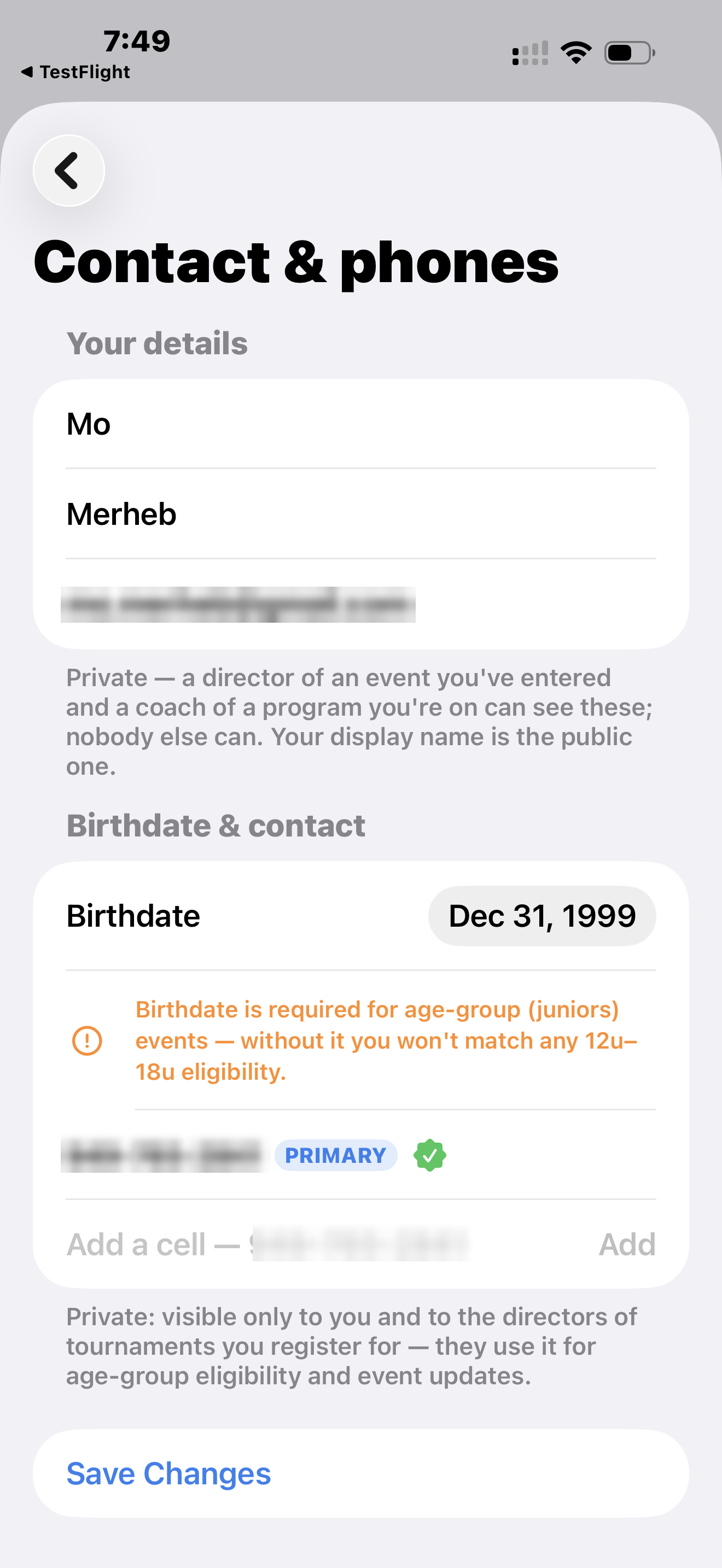
1. The member enters their own mobile number
In their profile the member types their mobile number. It is stored as unverified and cannot receive any message from this program.
A number added to a roster by a coach or tournament director is always stored as unverified and can never receive texts. Only the member can complete the next step.
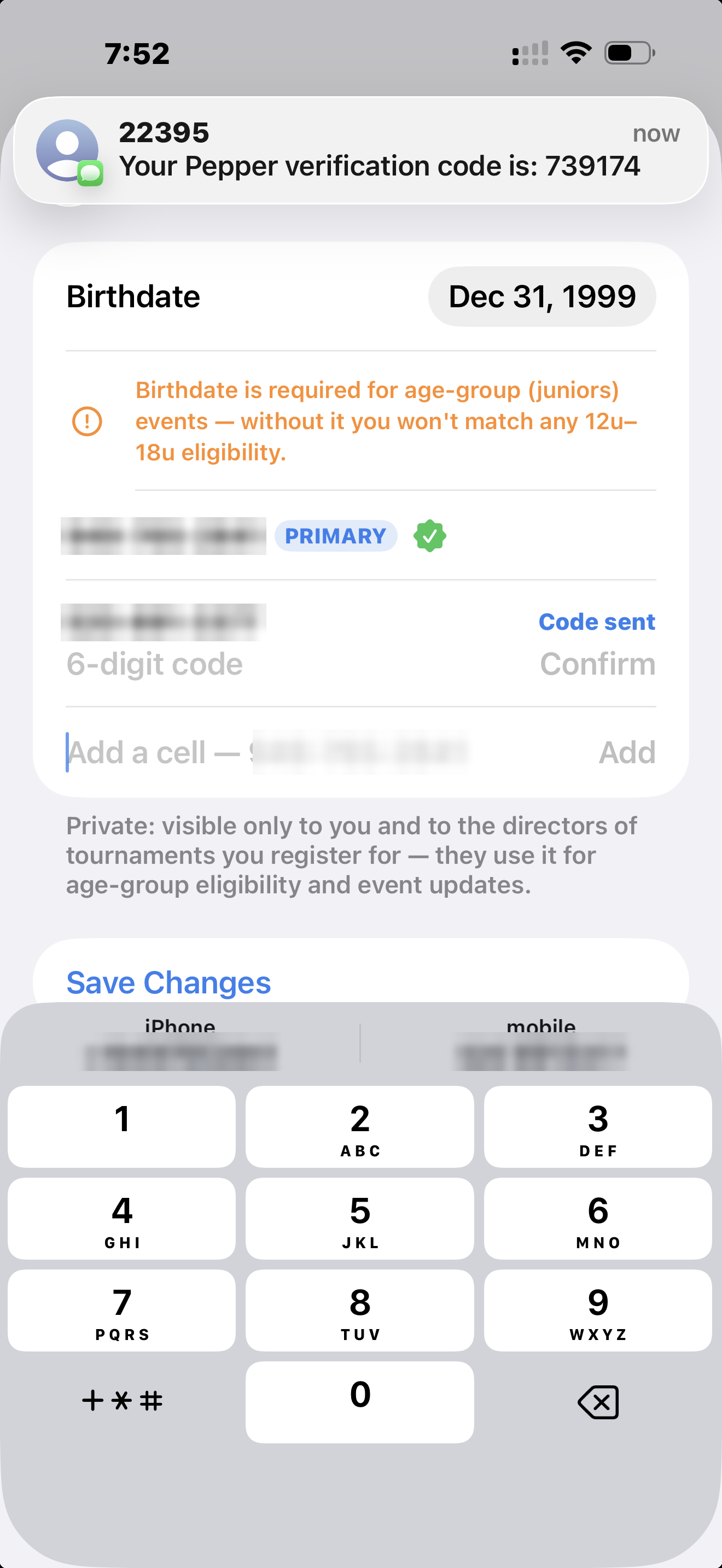
2. The member verifies the number by one‑time code
Pepper sends a one‑time code to that number and the member enters it in the app, proving the person holding the phone is the person asking for messages. A number that skips or fails this step stays unverified permanently.
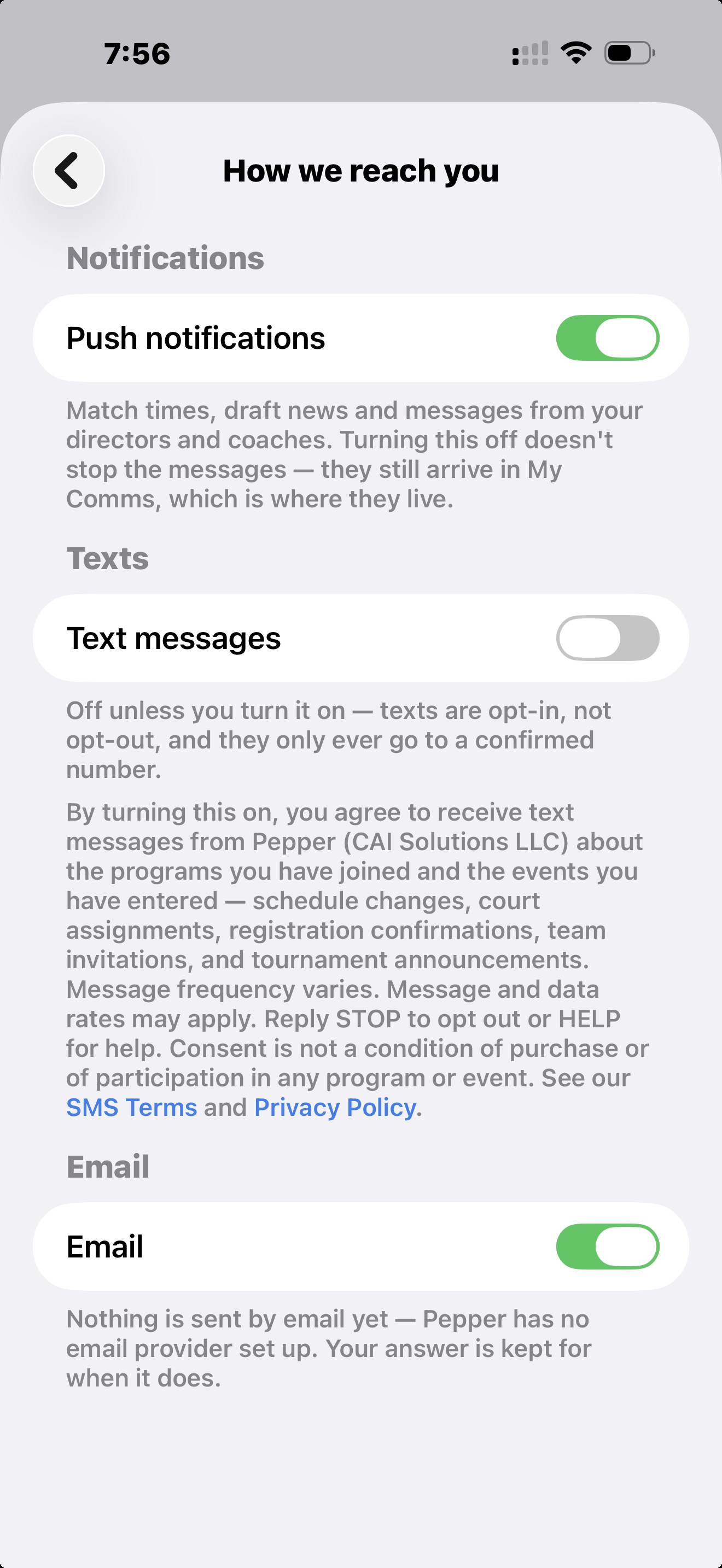
3. The member turns on “Text messages”
In notification settings the member switches on Text messages. This control is OFF by default on every account — nobody is enrolled automatically — and the app refuses to enable it unless the number was verified in step 2. The member can switch it back off at any time.
Consent language shown in the app
This text is printed on the settings screen immediately beside the Text messages control, and is visible in the step 3 screenshot above:
“By turning this on, you agree to receive text messages from Pepper (CAI Solutions LLC) about the programs you have joined and the events you have entered — schedule changes, court assignments, registration confirmations, team invitations, and tournament announcements. Message frequency varies. Message and data rates may apply. Reply STOP to opt out or HELP for help. Consent is not a condition of purchase or of participation in any program or event. See our SMS Terms and Privacy Policy.”
Consent is per member and never transferable. Joining a program or entering a tournament does not opt anyone in to text messages. Only the member's own verified number plus their own toggle produces consent, and the date, time, and method of that consent are recorded on their account.
Keywords and automated replies
| Reply with | What happens |
|---|---|
| STOP | All messages stop immediately and the opt‑out is recorded against the member's account, which the app then shows as Text messages off. STOP, STOPALL, END, CANCEL, UNSUBSCRIBE, and QUIT are all honored. “Pepper: You will not receive further texts. Reply START to resume.” |
| HELP | “Pepper: For help email [email protected] or call 972-885-8186. Msg & data rates may apply. Reply STOP to opt out.” |
| START | Messages resume for a member who previously replied STOP. START, YES, and UNSTOP are all honored. “Pepper (CAI Solutions): You are opted in to text messages. Msg frequency varies. Msg & data rates may apply. Reply HELP for help, STOP to opt out.” |
Examples of messages members receive
- “Pepper (Mira Costa Beach): Practice moved to 9:00am Saturday, same courts. See the app for details. Msg & data rates may apply. Reply HELP for help, STOP to opt out.”
- “Pepper (HB Open): Court 3 start pushed to 10:15am. Your updated schedule is in the app. Msg & data rates may apply. Reply HELP for help, STOP to opt out.”
- “Pepper: Registration is open for the HB Open on Sat Sep 12. Spots are limited — sign up in the Pepper app. Msg & data rates may apply. Reply HELP for help, STOP to opt out.”
Privacy of mobile information
No mobile information is sold, rented, or shared with third parties or affiliates for marketing or promotional purposes at any time. Text messaging originator opt‑in data and consent are never shared with any third party or lead generator for marketing purposes. Phone numbers are disclosed only to the messaging provider that delivers the messages a member asked for, and only for that purpose. See the Privacy Policy and SMS Terms for full detail.
Questions
Carriers, aggregators, and messaging providers may direct compliance questions to [email protected].
Pepper members can reach us at [email protected].
CAI Solutions LLC · 9330 LBJ Freeway, Suite 900, Dallas, TX 75243 · 972-885-8186